

FortiSwitch SNMPv3 Configuration
Today I configured FortiSwitch SNMPv3 across 26 FortiLink-managed switches in a live production environment — core, distribution, and access layers included. The goal was simple on paper: get two SNMPv3 users (one for NAC polling, one for our monitoring poller) working consistently on every switch. In practice, it took a small workaround to get right.
The first thing I ran into is that FortiLink-managed switches don’t let you push notify-hosts directly through the normal switch-controller SNMP user config. The switch GUI even warns you about this — local changes aren’t recommended once FortiLink takes over. So instead of fighting that, I used FortiOS custom-command blocks to inject the notify-hosts settings per switch, tied to each SNMPv3 user.
Building the FortiSwitch SNMPv3 configuration
Here’s roughly how I structured it:
- Created two SNMPv3 users under
switch-controller snmp-user, both set toauth-privwith SHA256 authentication and AES256 privacy. - Defined custom-command entries that push
notify-hostsviaconfig system snmp useron each managed switch. - Mapped those custom commands to every switch in the topology under
switch-controller managed-switch.
Step 1 — Create the SNMPv3 users on FortiGate (pushed to all managed FortiSwitches):
config switch-controller snmp-user
edit "nac"
set queries enable
set query-port 161
set security-level auth-priv
set auth-proto sha256
set auth-pwd *********
set priv-proto aes256
set priv-pwd *********
next
edit "nttpoller"
set queries enable
set query-port 161
set security-level auth-priv
set auth-proto sha256
set auth-pwd *********
set priv-proto aes256
set priv-pwd *********
next
end
Step 2 — Push the notify-host IPs via custom-command
config switch-controller custom-command
edit "snmpv3-nac-host"
set command "config system snmp user %0a edit nac %0a set notify-hosts 10.100.17.20 %0a next %0a end %0a"
next
edit "snmpv3-nttpoller-hosts"
set command "config system snmp user %0a edit nttpoller %0a set notify-hosts 10.127.12.13 10.12.19.14 10.12.19.15 10.12.19.16 %0a next %0a end %0a"
next
end
Step 3 — Assign those custom commands to the managed switch(es).
config switch-controller managed-switch
edit "FGT-MI-CORE-SW1"
config custom-command
edit "nac"
set command-name "snmpv3-nac-host"
next
edit "nttpoller"
set command-name "snmpv3-nttpoller-hosts"
next
end
next
edit "FGT-MI-CORE-SW2"
config custom-command
edit "nac"
set command-name "snmpv3-nac-host"
next
edit "nttpoller"
set command-name "snmpv3-nttpoller-hosts"
next
end
next
edit "FGT-MI-11TH-DST-SW1"
config custom-command
edit "nac"
set command-name "snmpv3-nac-host"
next
edit "nttpoller"
set command-name "snmpv3-nttpoller-hosts"
next
end
next
edit "FGT-MI-11TH-DST-SW2"
config custom-command
edit "nac"
set command-name "snmpv3-nac-host"
next
edit "nttpoller"
set command-name "snmpv3-nttpoller-hosts"
next
end
next
edit "FGT-MI-11TH-ACC-SW1"
config custom-command
edit "nac"
set command-name "snmpv3-nac-host"
next
edit "nttpoller"
set command-name "snmpv3-nttpoller-hosts"
next
end
next
edit "FGT-MI-11TH-ACC-SW2"
config custom-command
edit "nac"
set command-name "snmpv3-nac-host"
next
edit "nttpoller"
set command-name "snmpv3-nttpoller-hosts"
next
end
next
edit "FGT-MI-11TH-ACC-SW3"
config custom-command
edit "nac"
set command-name "snmpv3-nac-host"
next
edit "nttpoller"
set command-name "snmpv3-nttpoller-hosts"
next
end
next
This approach let the SNMPv3 user definitions live centrally on the FortiGate while still getting each switch to fire traps to the right destinations.
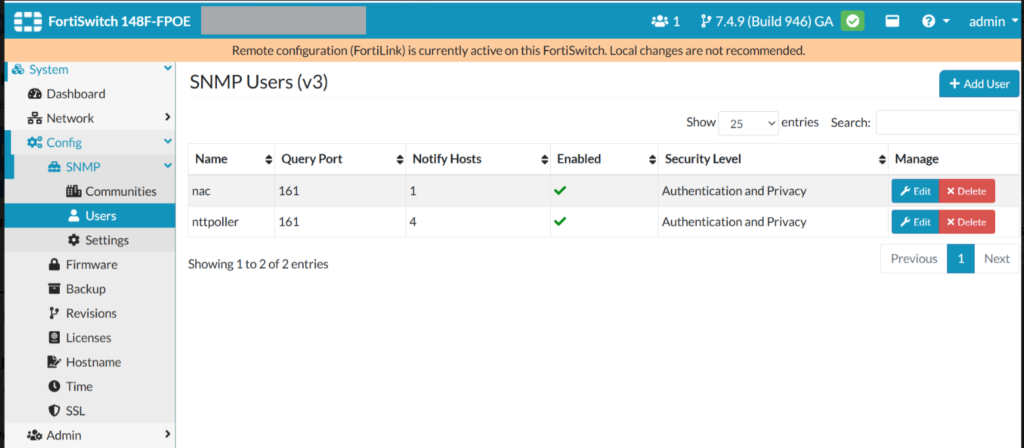
After pushing the config, I checked the SNMP Users page directly on a switch’s local GUI (FortiSwitch 148F running 7.4.9) and confirmed both users showed up with the correct query port, security level, and a populated notify-hosts count. That was the moment I knew the workaround actually worked instead of just looking right on paper.
I also pulled up the Managed FortiSwitches view on the FortiGate to confirm all 26 units were online and pulling the expected firmware after the push — no switch dropped off FortiLink during the change, which is always a relief on a production switch stack. If you want the cluster-side equivalent of this kind of health check, my FortiGate HA commands and troubleshooting guide walks through the same idea on the firewall side.
For the official baseline on how FortiSwitch handles SNMP under FortiLink — read-only access, MIB requirements, and the firewall policy needed for trap traffic — Fortinet’s own Configuring SNMP page in the FortiSwitch documentation is worth keeping open in another tab while you work through this.
One lesson from today: don’t assume the switch-controller SNMP user block alone is enough on FortiLink setups. If you need notify-hosts behavior, plan for the custom-command route from the start rather than discovering it mid-change.
If you’re working through a similar FortiSwitch SNMPv3 configuration on FortiLink, test the custom-command push on one switch first before rolling it to the whole stack — it saved me from doing this twice. For more FortiGate and FortiSwitch field notes like this one, check out the Fortigate category on NetConfig.io.
🔧 Free Network Tools
Handy while you're troubleshooting — no signup needed.