

Published: July 2026 · Category: Automation · Author: Network Troves · Applies to: FortiGate (FortiOS 7.x/8.x), Python 3.x
FortiGate static route with REST API automation is what I set up today instead of clicking through the GUI or hand-typing CLI commands. If you’re managing more than a handful of firewalls, this is one of the first automation wins worth building.
Pushing a route this way means sending a POST request to /api/v2/cmdb/router/static, authenticated with a bearer token instead of username/password. It’s the same underlying config the GUI writes, just triggered from a script.
Why I Set Up FortiGate Static Route with REST API
I had a new /24 that needed a static route pointing out wan1 via a specific gateway. One route, one firewall — not worth automating on its own. But I wanted the pattern in place before I’m doing this across a dozen branch FortiGates where consistency and speed actually matter.
Environment
- FortiGate-60F running FortiOS v8.0.0, build 167
- Python 3.x with the
requestsandurllib3libraries - REST API admin profile with a generated API token
- Management access over HTTPS to the FortiGate’s admin interface
Generating the API Token
Before any of this works, you need a REST API admin configured under System > Administrators, scoped to the right permission profile, with an API token generated. Fortinet ties the token to a specific source IP by default (a trusted host restriction), so if your script runs from a different subnet than expected, you’ll get an auth failure before you even get to the routing logic. I keep tokens scoped tightly — no reason to hand a script full super-admin rights just to write one config table.
The Script
Here’s the working script, cleaned up:
import requests
import json
import urllib3

urllib3.disable_warnings(urllib3.exceptions.InsecureRequestWarning)

FORTIGATE_IP = "your.fortigate.ip"
API_TOKEN = "your-api-token-here"

DESTINATION_SUBNET = "10.200.10.0 255.255.255.0"
GATEWAY_IP = "192.168.70.1"
OUTBOUND_INTERFACE = "wan1"

url = f"https://{FORTIGATE_IP}/api/v2/cmdb/router/static"

headers = {
    'Content-Type': 'application/json',
    'Authorization': f'Bearer {API_TOKEN}'
}

payload = {
    "json": {
        "dst": DESTINATION_SUBNET,
        "gateway": GATEWAY_IP,
        "device": OUTBOUND_INTERFACE,
        "comment": "Provisioned automatically via Python REST API script"
    }
}

response = requests.post(url, headers=headers, json=payload, verify=False)

if response.status_code == 200:
    output = response.json()
    print("Configuration Applied Successfully!")
    print(json.dumps(output, indent=4))
else:
    print(f"Failed! HTTP Status Code: {response.status_code}")
    print(response.text)
A couple of details that tripped me up the first time I wrote something like this:
- The
dstfield format. FortiOS wants destination and subnet mask as a single space-separated string ("10.200.10.0 255.255.255.0"), not CIDR notation. Send CIDR and you’ll get a 400 back. - The payload wrapper. The FortiOS CMDB API expects the actual route attributes nested under a top-level
"json"key. Miss that and the request technically succeeds but writes nothing useful. verify=False. Fine for a lab or internal management network with a self-signed cert. In production, I’d rather pin the cert or add it to a trust store than blanket-disable TLS verification — silencing the warning doesn’t remove the risk, it just hides it. If you’re debugging a request that isn’t landing the way you expect, the workflow in my FortiGate debug commands guide for packet flow and IPsec applies here too — samediagnose debugtoolkit, just pointed at a config push instead of traffic.
Verification
After running the script, the API returned "status": "success" with "http_status": 200 and an mkey of 2 — that’s the internal object index FortiOS assigned the new route entry.
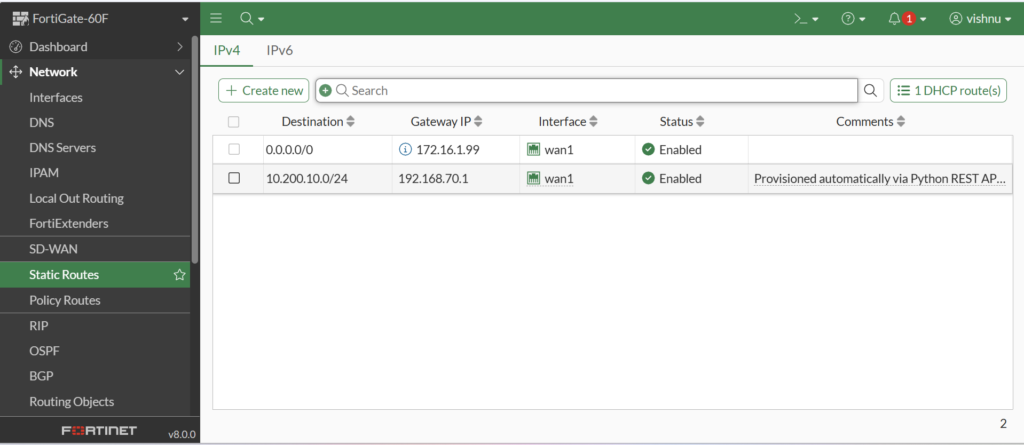
Checking Network > Static Routes in the GUI confirmed it: the 10.200.10.0/24 route showed up pointed to 192.168.70.1 via wan1, marked Enabled, with the comment field carrying through exactly as sent in the script.
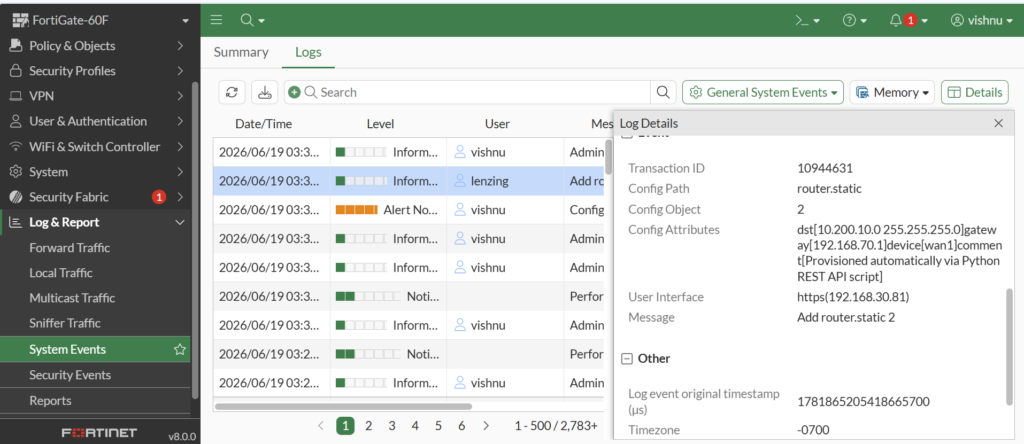
I also pulled the event log under Log & Report > System Events, which recorded the transaction cleanly — config path router.static, config object 2, with the destination, gateway, device, and comment all logged as config attributes. That log entry is useful if you’re building an audit trail for changes pushed outside the GUI, the same habit I lean on when I’m auditing switch-side changes in my FortiSwitch SNMPv3 configuration via FortiLink writeup.
Troubleshooting Notes
- 401 Unauthorized — almost always the trusted host restriction on the API admin, not a bad token. Check the source IP the request is actually coming from.
- 400 Bad Request on
dst— check for CIDR notation instead of the space-separated mask format. - 200 response but no visible route — check VDOM. If you’re running multi-VDOM and the token’s admin profile is scoped to a non-root VDOM, the route lands somewhere you’re not looking.
Lessons Learned
The REST API mirrors the CMDB structure almost exactly, so if you already know your way around FortiGate config paths from the CLI (config router static), the API payload structure isn’t a big leap. The friction is almost entirely in formatting quirks like the dst field and the json wrapper — not in the networking logic itself. That’s the real value of setting up a FortiGate static route with REST API: once the payload format clicks, it’s a repeatable five-minute job instead of a GUI walkthrough on every box. If you’re new to FortiOS diagnostics generally, my FortiGate debug flow functions reference guide is a good companion piece for understanding how FortiOS processes config and traffic under the hood.
Best Practices
- Scope API admin tokens to the minimum required permission profile
- Restrict tokens to trusted source IPs rather than leaving them open
- Store tokens in environment variables or a secrets manager, never hardcoded in a script that might end up in version control
- Log every automated change with a descriptive comment field, like I did here, so it’s traceable later
- Test against a lab FortiGate before pointing scripts at production
FAQ
Can I add a FortiGate static route without the GUI?
Yes. The FortiOS REST API accepts a POST request to /api/v2/cmdb/router/static with the destination, gateway, and outbound interface in the payload, authenticated by an API token.
What format does the FortiGate API expect for the destination subnet?
A space-separated string of network address and subnet mask, such as "10.200.10.0 255.255.255.0" — not CIDR notation.
Why does my FortiGate API request return 401?
Usually the API admin’s trusted host restriction is blocking the source IP the request is coming from, not an invalid token.
Is verify=False safe to use with the FortiGate REST API?
It’s acceptable for lab environments with self-signed certs, but in production it’s safer to properly trust the certificate rather than disable TLS verification entirely.
Does the FortiGate REST API support other routing protocols besides static routes?
Yes — CMDB endpoints exist for BGP, OSPF, and other router configuration objects under the same /api/v2/cmdb/router/ path structure.
🔧 Free Network Tools
Handy while you're troubleshooting — no signup needed.