Cisco IKEv1 Debug Commands and States – Phase 1 & 2
Cisco IKEv1 Debug Commands and States and-A Real Troubleshooting Reference
This is Part 1 of a 3-part series on Cisco IKE debugging. Part 2 covers IKEv2 states and commands. Part 3 is a side-by-side IKEv1 vs IKEv2 state comparison.
Let me tell you exactly how this article came to exist.
I was working a site-to-site VPN case — tunnel wouldn’t fully come up, Phase 1 was showing QM_IDLE in show crypto isakmp sa but traffic wasn’t moving. I had debug crypto isakmp running on the console and the output was scrolling faster than I could process it. I knew roughly what I was looking for but kept second-guessing myself on what each state transition actually meant at that specific point in the negotiation.
After the case closed I sat down and wrote all of it out properly. Not the conceptual “here’s how IKE works” explanation — there’s no shortage of that online. What I needed during that case was a clean reference for what each named state means, what the debug output looks like when things are working, and exactly what each failure mode points to.
This is that reference, starting with IKEv1.
Before You Touch Debug — Read the SA State First
This is the habit I’ve built across enough cases that I don’t deviate from it anymore. Before enabling any debug, run these three commands and actually read the output:
show crypto isakmp sa          ! Phase 1 SA state column — where is the state machine right now?
show crypto ipsec sa           ! Phase 2 SAs — check encaps/decaps counters immediately
show crypto session            ! Quick overview of all active sessions and status
The reason show crypto ipsec sacomes first is that the encaps and decaps counters tell you something critical before you open a single line of debug: whether you’re dealing with a negotiation problem or a forwarding problem on an already-established SA. If encaps is incrementing on one side but decaps is zero on the other, packets are going out but not arriving — that’s a routing, ACL, or MTU issue, not an IKE problem. No amount of debug crypto isakmp will help you there.
Once you’ve confirmed it’s actually a negotiation issue, enable debug:
terminal monitor               ! Essential if you're on SSH rather than console
debug crypto isakmp            ! IKEv1 state machine, message processing, SA events
debug crypto ipsec             ! Phase 2 SA installation and proxy ID events
And clean up when you’re done — always:
undebug allLeaving crypto debug running on a production device under load is a bad day waiting to happen.
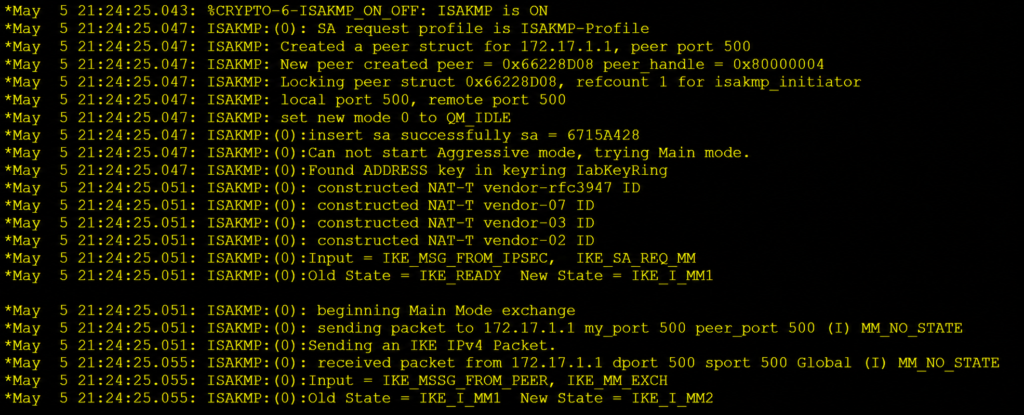
IKEv1 Phase 1 — Understanding the Main Mode State Machine
Main Mode is 6 messages exchanged across 3 request/response pairs. Each pair advances the ISAKMP SA through a named state, and those state names are what you’ll see in the State column of show crypto isakmp sa and in the Old State / New State transitions in debug output.
Here are all five named states in order:
MM_NO_STATE    → ISAKMP SA object created, no messages exchanged yet. This is the starting point.
MM_SA_SETUP    → MM1 and MM2 complete. SA proposal negotiated — both sides agreed on a matching policy.
MM_KEY_EXCH    → MM3 and MM4 complete. Diffie-Hellman key exchange and nonces done.
MM_KEY_AUTH    → MM5 and MM6 complete. Identity and authentication verified. Phase 1 is up.
QM_IDLE        → Phase 1 SA fully established and sitting idle. Ready to negotiate Phase 2.
The important thing to understand about these states is that they’re sequential and non-recoverable mid-negotiation. If the state machine stalls at MM_SA_SETUP, it isn’t going to somehow work around the problem and advance to MM_KEY_EXCH. The negotiation fails, the SA gets torn down, and the initiator tries again. Which means wherever you see the state frozen, that’s the exact layer your problem lives at.
What Clean Main Mode Debug Looks Like
This is what you want to see scrolling across your console — a successful Main Mode negotiation on the initiator side:
ISAKMP: Created a peer struct for 203.0.113.2
ISAKMP:(0): processing SA payload. message ID = 0
ISAKMP:(0): Checking ISAKMP transform against priority 10 policy
ISAKMP:(0): atts are acceptable. Next payload is 0
ISAKMP:(0): SA is doing pre-shared key authentication
ISAKMP:(0):Old State = IKE_READY  New State = IKE_I_MM1
ISAKMP:(0): processing KE payload. message ID = 0
ISAKMP:(0): processing NONCE payload. message ID = 0
ISAKMP:(0):Old State = IKE_I_MM1  New State = IKE_I_MM2
ISAKMP:(0): processing ID payload. message ID = 0
ISAKMP:(0): processing HASH payload. message ID = 0
ISAKMP:(0):SA authentication status: authenticated
ISAKMP:(0):Old State = IKE_I_MM3  New State = IKE_I_MM4
ISAKMP:(0):Old State = IKE_I_MM5  New State = IKE_P1_COMPLETE
That final IKE_P1_COMPLETE transition is what you’re looking for. Everything before it is the journey — the state transitions advancing cleanly from IKE_I_MM1 through to completion. The moment that progression stops, you have your diagnostic anchor point.
Diagnosing Main Mode Failures by State
Stuck at MM_NO_STATE
This was actually the problem on the case that prompted this whole article initially — tunnel appeared in show crypto isakmp sa, state column said MM_NO_STATE, and nothing happened after that. No progression, no error, just a frozen entry.
MM_NO_STATE means the local router created the ISAKMP SA object and attempted to send MM1, but either the remote peer never responded or responded with a rejection. Three causes dominate:
Phase 1 policy mismatch — the most common one. Your initiator proposes a set of encryption, hash, DH group, and lifetime parameters, and the responder has no policy that matches. Watch for this in debug:
ISAKMP:(0): Checking ISAKMP transform against priority 10 policy
ISAKMP:(0): atts are not acceptable. Next payload is 0
ISAKMP:(0): no offers accepted!
No atts are acceptable line means no policy matched. Pull show crypto isakmp policy on both sides and compare every parameter. Lifetime mismatches are the sneaky one — not every platform handles lifetime mismatch the same way, and some will negotiate through it while others won’t.
UDP 500 blocked in transit — the initiator sends MM1 and hears nothing back. You’ll see the peer struct created in debug and then silence. Check any transit firewalls or ACLs between the two peers. If NAT exists anywhere in the path, you’ll also need NAT-T on UDP 4500 — standard UDP 500 won’t work through NAT reliably.
Stale SA on one side — one peer reset and is trying to renegotiate, but the remote side still has a valid-looking SA and isn’t expecting a new negotiation. Fix: clear crypto isakmp on both sides and force a fresh start.
Stuck at MM_KEY_AUTH — Authentication Failures
If your debug gets through MM_SA_SETUP and MM_KEY_EXCH cleanly but falls over at the authentication step, you’ll see something like this:
ISAKMP:(0): processing ID payload. message ID = 0
ISAKMP:(0): processing HASH payload. message ID = 0
ISAKMP:(0): SA authentication status: FAILED
%CRYPTO-6-IKMP_MODE_FAILURE: Processing of Main Mode failed with peer at 203.0.113.2
Phase 1 policy matched and DH succeeded — the cryptographic groundwork is done — but authentication itself failed. In my experience this comes down to one of three things:
PSK mismatch — the obvious one, but worth checking carefully. Copy-paste errors with trailing spaces are more common than you’d think, and there’s no visible indicator when you run show run since the key is masked.
PSK keyed to the wrong peer address — on Cisco IOS, crypto isakmp key binds the pre-shared key to a specific peer IP. If NAT is changing the source address somewhere between the two peers, the key lookup fails because the router is looking up the PSK against the NATted address, not the real one.
Identity type mismatch — this one is subtle. If one side has crypto isakmp identity address (default) and the other has crypto isakmp identity hostname, the ID payloads in MM5 and MM6 don’t match even if the PSK itself is correct. The HASH verification fails because the identity data being hashed is different on each side.
IKEv1 Phase 1 — Aggressive Mode
Aggressive Mode isn’t something I see in new enterprise designs — most modern site-to-site deployments run Main Mode for the security properties — but it shows up constantly in legacy configurations and some remote access dial-in scenarios, so it’s worth knowing.
Aggressive Mode collapses Main Mode’s 6 messages into 3 by bundling the SA proposal, DH key exchange, nonces, and peer identity into the first exchange. Faster handshake, but peer identity is transmitted unencrypted in AM1 and AM2 — anyone capturing the exchange can see who the peers are.
AG_NO_STATE    → Initial state. AM1 not yet sent or processed.
AG_INIT_EXCH   → AM1 and AM2 complete. SA, KE, nonce, and identity all exchanged together.
AG_AUTH        → AM3 complete. HASH authentication verified. Phase 1 done.
QM_IDLE        → Ready to negotiate Phase 2 via Quick Mode.
Troubleshooting logic maps directly to Main Mode. AG_NO_STATE stall means policy mismatch or reachability — same causes, same debug signatures. Failure transitioning from AG_INIT_EXCH to AG_AUTH means PSK or identity mismatch — same three root causes.
The main practical difference is that with Aggressive Mode you have less diagnostic information in the early debug output because MM1 and MM2’s worth of information arrives bundled together. The state machine moves faster but the failure modes are the same.
IKEv1 Phase 2 — Quick Mode States
Once Phase 1 reaches QM_IDLE, Quick Mode negotiates the actual IPsec SAs — the encryption and integrity parameters the data plane will use, and the proxy identities that define what traffic gets protected. Quick Mode is 3 messages.
QM_IDLE        → Phase 1 up and idle. No Quick Mode exchange in progress.
QM1            → QM message 1 sent or received: proxy IDs, SA proposal, nonce, optional KE for PFS.
QM2            → QM message 2 returned: responder's SA parameters and nonce.
QM_NEW_SA      → QM message 3: hash confirmation, IPsec SA keying material installed.
QM_IDLE        → Returns to idle after SA is established. Steady state.
Clean Quick Mode debug — this is what IKE_QM_PHASE2_COMPLETE looks like when everything works:
ISAKMP:(1001): processing SA payload. message ID = 123456
ISAKMP:(1001): Checking IPSec proposal 1
ISAKMP:(1001): atts are acceptable.
ISAKMP:(1001): processing NONCE payload. message ID = 123456
ISAKMP:(1001): processing ID payload. message ID = 123456
ISAKMP:(1001): processing ID payload. message ID = 123456
ISAKMP:(1001): Creating IPSec SAs
ISAKMP:(1001):Old State = IKE_QM_I_QM1  New State = IKE_QM_PHASE2_COMPLETE
IPSEC(key_engine): got a queue event with 1 KMI message(s)
IPSEC(initialize_sas):
   (key eng. msg.) dest= 198.51.100.1, src= 203.0.113.2,
    dest_proxy= 192.168.10.0/255.255.255.0, src_proxy= 192.168.20.0/255.255.255.0,
    protocol= ESP, transform= esp-aes esp-sha256-hmac
Note the initialize_sas block at the bottom — that’s the proxy ID confirmation. The dest_proxy and src_proxy values showing up there should match exactly what’s in your crypto ACLs on both sides. If they don’t match what you expect, that’s your problem right there.
Stuck at QM1 — The Phase 2 Failure I Hit Most
This was the actual problem in the case I mentioned at the start. Phase 1 was QM_IDLE, everything looked fine, but traffic wasn’t passing. Quick Mode kept initiating and dying at QM1 with no further state transition. Two causes produce distinct debug signatures:
Transform-set mismatch:
ISAKMP:(1001): IPSec policy invalidated proposal
ISAKMP:(1001): phase 2 SA policy not acceptable!
Run show crypto ipsec transform-set on both sides and compare encryption algorithm, hash algorithm, and PFS group. PFS is the tricky one — if one side has PFS configured with a DH group and the other side has no PFS configured at all, Quick Mode fails immediately at QM1 with no obvious error beyond policy not acceptable.
Proxy ID mismatch:
ISAKMP:(1001): Failed to find matching identityThe crypto ACLs have to be exact mirrors of each other. What your initiator lists as source, the responder must list as destination — and vice versa. Even small notation differences between platforms will break it. The case that prompted this article had a /32 host route on one side and a /24 subnet on the other. The initiator proposed the host, the responder expected the subnet, and Quick Mode failed immediately every time.
ISAKMP Notify Messages and Syslog Events
These are the error signals that appear in debug output alongside state transitions. Know these and you can triage a lot faster:
INVALID-ID-INFORMATION       → Phase 1 identity mismatch between peers
ATTRIBUTES-NOT-SUPPORTED     → Phase 1 policy mismatch — no matching proposal found
PAYLOAD-MALFORMED            → Malformed packet — almost always a path MTU or fragmentation issue
NO-PROPOSAL-CHOSEN           → Phase 2 transform-set mismatch
INVALID-COOKIE               → Stale or mismatched SPI — usually after one peer reset without the other knowing
Syslog messages that appear alongside these in real output:
%CRYPTO-4-IKMP_NO_SA
→ The router received IKE traffic but can't find a matching SA for it.
  Usually means one peer reset and renegotiated but the local SA is still stale.
  Fix: clear crypto isakmp on the local side.

%CRYPTO-6-IKMP_MODE_FAILURE: Processing of Main Mode failed with peer at <ip>
→ Phase 1 authentication failed at MM5/MM6.
  PSK wrong, keyed to wrong IP, or identity type mismatch.

%CRYPTO-4-RECVD_PKT_NOT_IPSEC: Rec'd packet not an IPSEC packet
→ Traffic matched an IPsec policy but arrived as plain unencrypted IP.
  One side's Phase 2 SA expired or was cleared; the other side doesn't know yet.
  Fix: clear crypto sa on both sides simultaneously.

%CRYPTO-4-IKMP_BAD_MM_NO_FILTER: Cannot accept Main Mode exchange from <ip>
→ Received a Phase 1 initiation from a peer address with no matching crypto map entry.
  Check your crypto map peer statement or isakmp policy.
RECVD_PKT_NOT_IPSEC is the one I’ve probably hit most often across different environments. Once you know what it means it’s actually useful — it tells you immediately that the Phase 2 SA desynchronised between peers rather than anything being fundamentally misconfigured. clear crypto sa on both sides at the same time and reinitiate.
Quick Troubleshooting Reference
| State Stuck At | What It Means | Where to Look |
| MM_NO_STATE | Policy mismatch or no return traffic | show crypto isakmp policy both sides, check UDP 500 |
| MM_SA_SETUP | Policy partially matched but failed | Compare every parameter — lifetime is a common miss |
| MM_KEY_AUTH | Authentication failed | PSK, PSK peer IP binding, identity type |
| QM1 | Phase 2 negotiation failed | Transform-set or crypto ACL proxy ID mismatch |
| QM2 | Rare — responder accepted but hash failed | Check for replay or timing issues |
Standard Debug Workflow for IKEv1
! Step 1 — Read state before anything else
show crypto isakmp sa
show crypto ipsec sa

! Step 2 — Clear stale SAs if needed
clear crypto isakmp
clear crypto sa

! Step 3 — Enable debug and trigger traffic
terminal monitor
debug crypto isakmp
debug crypto ipsec
ping <remote-protected-subnet> source <local-interface>

! Step 4 — Find the last state transition in output
! Match it against the tables above

! Step 5 — Always clean up
undebug all
If the tunnel comes up via this debug flow but traffic still isn’t forwarding correctly after Phase 2 establishes, the problem has moved past IKE into the forwarding plane. At that point the right tool is packet-level tracing rather than crypto debug. If one of your peers is a FortiGate, our FortiGate debug flow functions reference and packet flow guide cover what to run on the FortiOS side to correlate against what Cisco is showing you here.
For remote access VPN scenarios rather than site-to-site, the FortiGate IPsec remote access VPN guide is worth reading separately — Mode Config and IKEv1 aggressive mode for remote clients behaves differently from site-to-site Main Mode and has its own failure patterns.
FAQ
Q: What’s the fastest way to confirm whether my IKEv1 failure is Phase 1 or Phase 2?
Run show crypto isakmp sa and look at the state column. If the state is anything other than QM_IDLE, your problem is Phase 1. If it shows QM_IDLE but traffic isn’t passing, Phase 1 is working and the problem is either Phase 2 or the forwarding plane. At that point run show crypto ipsec sa and check the encaps/decaps counters before touching debug.
Q: show crypto isakmp sa shows QM_IDLE but I can’t ping across the tunnel — is this a Phase 2 issue?
Not necessarily — check the encaps and decaps counters in show crypto ipsec sa first. If encaps is incrementing but decaps is zero, the Phase 2 SA is installed and packets are being encrypted on one side but never arriving on the other. That’s a routing or ACL problem in the network between peers, not a Phase 2 negotiation failure. Only if both counters are zero should you go hunting for a Phase 2 debug problem.
Q: I cleared the crypto SA and the tunnel came back up but RECVD_PKT_NOT_IPSEC keeps recurring — what’s wrong?
Recurring RECVD_PKT_NOT_IPSEC after clearing usually indicates a large SA lifetime mismatch between the two peers. When one side’s SA expires and it renegotiates, the other side’s SA is still valid and it keeps sending encrypted traffic — which the renegotiating side now sees as unexpected unencrypted traffic. Check your Phase 2 lifetime settings with show crypto ipsec transform-set and show crypto map and make sure both peers are configured with the same values.
Q: Can I run debug crypto isakmp on a production device?
Yes, but carefully. On a lightly loaded device or during a maintenance window it’s fine. On a device handling hundreds of concurrent IKE sessions the output volume can impact performance. Use it surgically — enable it, trigger the specific failing tunnel, capture what you need, then undebug all immediately. Never leave it running unattended.
Q: My Phase 1 shows QM_IDLE almost immediately without any debug output — is that normal?
It means the Phase 1 SA was already established before you enabled debug. The existing SA is being reused. If you want to force a fresh Phase 1 negotiation through debug from the beginning, run clear crypto isakmp first, then enable debug, then trigger traffic.
Official Documentation Link- IPSec and IKE debugs